 DabbleBoard is a collaborative/communication tool. It works like a whiteboard but instead of just typing or drawing things on the blank screen, you can also include images on it. I think it can be useful when students are trying to work on a project together, they can show each other what kind of images they want to use/they find interesting and such. There is also a chatting function on the side, they can also do video/audio conversation over this chatbox.
Wednesday, March 10, 2010
DabbleBoard
DabbleBoard is a collaborative/communication tool. It works like a whiteboard but instead of just typing or drawing things on the blank screen, you can also include images on it. I think it can be useful when students are trying to work on a project together, they can show each other what kind of images they want to use/they find interesting and such. There is also a chatting function on the side, they can also do video/audio conversation over this chatbox.
Tuesday, March 9, 2010
Finale

So here we are, the last week of winter term, finale of every class. It is time to reflect back to what we did, what we like and what we do not like about everything. EDST 211 class has been a very interesting class for me, especially the part where our daily assignments are to blog, we showed what we did through blogging (even now?). But the way our class structured is the foreshadow of the future classrooms in many other schools, or maybe it has been the intention all along : let us experience what it is like to be in a technological setting classroom. The past decade has been a turning point for all the educators and students in the education world. The education expectations of the new generation is going to be different. Technology has taken a big role in education. Aside from the fun students could have from playing computer games, Internet has provided educators and students different tools to use, and to take the learning to a next level. Making such change like this isn’t easy, it takes each and every one of us to make it happen. In our class, our PLN groups work as motivators, an inspiration, encouraging each of us to take a step to learn the newest technological tools. To experience, and hopefully to use it in future classrooms. I believe the future classrooms would be a hybrid that involves both traditional lectures and the use of technology. The use of technology allow us all the be creative, to think outside the box, because there seem to be no limit in World Wide Web! It has all kinds of tools that we have yet to discover. Us, future educators, have to be prepare for such a change and ready for the students whose expectations are going to be very different. They grow up as digital natives, computers and cellphones are not new vocabularies to them. We look outside the classroom and see a world that cannot live without Internet and other advancing technology tools. Then we look at the young students who are eager to learn more about the computers. It is time for all educators to understand that they are the bridge between the young generation and the reality world. What we want for our students is for them to be well prepared for what they are about to face after they get out of school! It is very important to break the traditional-sit-in-the-classroom-and-just-listen setting for students. After this class, I have thoroughly thought about what do I want to do with my future classroom. And I expect by then, computers would be widely used in schools. I think the best approach to blend traditional teaching and technology together is to teach the students the basics about certain topics in classrooms in a traditional setting, or maybe with SmartBoard lessons, then allow them to create projects out of the various technological tools. It is a vision of how I picture a future classroom would be, which I don’t think it’s impossible with such an accelerated growth of technology. Overall, my class experience have broaden my old views towards education, and has definitely prepared me to investigate more different new tools for future classrooms and lead the students towards a new world of technology.
eBistro

eBistro was a very creative website that showed viewers a restaurant with a menu in the middle. There are various types of educational technology tips provided on the menu for "customers" to feast on. I really enjoyed clicking around the menu. This type of website is definitely better than the boring formal detailed websites. It is appealing to the eye and more interesting than it looked like. The tips under each category (Appetizers, Specials, Desserts etc) are somewhat related. For example for the Desserts part, the tips are more of the fun side of technological tools. Like Photostory, they are the "icing on the cake".
Lists of things!
Technology Projects to Enhance Classrooms
- Powerpoint Projects: Easy, formal for various kinds of presentation
- Movie Projects: For an English project? Act out the stories they read
- Photos Project: Take pictures of different living things in nature for Science
- SmartBoard: They can create their own lessons for peers
- Game making websites: They can have fun creating crosswords and learn at the same time!
- Make their own website/blog: Make it like a journal every week, enhance writing skills
- September: Mixbook - Introducing themselves to their peers using Mixbook
- October: Blogger - Start a blog to type journal every week.
- November: Glogster - Create a poster on history of Thanksgiving.
- December: SmartBoard - Create a math lesson out with the topic of Christmas
- January: Google Earth - Geography lessons and projects
- February: Photo Story - About the people they love
- March: Yola.com - Create a website about a state
- April: Puzzlemaker - Make a puzzle on any subjects they like, and give out to peers
- May: Quizlet - Create a quiz that they can test each other on, either spelling or math
- June: Fotobabble: Reflecting on their school year
Google Site Rubric
 This is the rubric we came out as a group. The general category that we would look into for each Google site is Interest, Spelling, Images, Navigation, Content and Appearance. We think that these are the qualities that a website should have. Interest means that if the viewers can be interested in this website by first sight. Spelling is very self explanatory, limited or none spelling or grammatical errors considered the best. Images, how each image goes with the topic of the page itself. Navigation, does the link take the viewers to the page they want to go? Content, is there a fully informative page or just a few lines jotted down. Last but not least, the appearance, the overall neatness and appeal of the website.
Fotobabble
 I felt like I used this photo a lot, but I really liked it... Fotobabble is a tool that allow us to make talking photos. I like to experience this because this is a tool that students are more likely to use in their learning experience. They can embed their Fotobabble into their digital projects, or just presentations in any other subjects. Fotobabble has made it convenient for educators and students, to avoid the trouble of purchasing recording systems for each computer in school. There are also a lot of websites out there for teachers to create podcasts either to revise spelling words with students, or simply an introduction in the beginning of class.
Newsletter
This is a newsletter created as a PLN group. It shares different tools and webpages that our group considered educational and useful for students with parents. This type of newsletter allows parents to access online, it is more convenient and generally more environmental friendly. It is easy for teachers to create such beautiful and informative newsletter online too.
Thursday, March 4, 2010
Yola!
 Here's another website I create with Yola.com on the same subject as the one I created with Wikispace. I especially like Yola better because it is fairly simple with a large collection of templates to choose from. I am fairly stubborn with having an attractive and interesting layout the make the website look better. I think Yola is a better tool for creating personal websites, the steps are simple, just click create a new page then the navigation would automatically pop up in the menu bar, no matter where it is. Wikispace and Google sites is more professional or educational based, while Yola is more flexible. I think Yola can also be one of the tools for students to use to create their own projects.
Wednesday, March 3, 2010
Voicethread
 Voicethread is where we can easily record our voice along with an image. Other viewers can leave comment on the side. I think Voicethread is useful when it comes to group projects and presentations. Students can have discussions through Voicethreads outside of classroom, audio from Voicethread can also become a part of their project to spice things up for their projects. It would be very interesting for them to record their voice and use in daily assignments as an alternative to presentations or show and tell.
Google Earth Tour
 Google Earth is a software that Internet users can download for free. It is like a 3D world map with precise views everywhere. I am very impressed with this software, it even has the exact longitude and latitude for each location. Google Earth is definitely a useful tool for students who are starting to learn world geography. Instead of learning it from a flat map, they can use this tool to explore different aspects on a map. Simple tasks like finding the famous landscape from Google Earth can be a lot of fun in class.
Mixbook


I am in love with Mixbook! It is a very fun tool with beautiful templates, I get to create online scrapbooks easily, just upload pictures and drag them to whichever page you want. I think it is a useful tool when students have do family projects, something like introducing their families and friends to the peers in classroom. Instead of having them to write and print pictures, they can definitely use this website. Afterall, typing and uploading pictures is always easier to do.
WikiSpace
Here is a link to my wikispace: http://japaneselessons.wikispaces.com/
I did mine on Japanese language lessons. Wikispace is obviously more confusing for me than Googlesite. I got so lost with where to choose the templates and how one page can link to another. Comparatively, Googlesite has a larger selection of templates and layouts for me to choose from, it is also ad-free! I've been pretty annoyed by the ads on the right hand side while I was working on the site the whole time. The only thing I found it better than Googlesite is that when I add a new page, it automatically adds a link under navigation. While on Googlesite, I had to go back to "Manage Site" to add the link on my side menu.
Saturday, February 20, 2010
Glogster

Glogster.com has definitely became one of my favorite website from all the ones we have browsed... It is just so much fun to be creative and make posters on your computers. Teachers can definitely save more time to compose a beautiful poster on Glogster, it is better than spending a long while to glue and paste things onto a big paper (Oh yeah, and it saves paper again). They can always save posters they created and reuse it again later on. For an actual paper poster... Well, let's just say a digital image won't get dusty anytime soon. It is a fun tool, so why not?
Tuesday, February 16, 2010
Quizlets and SpellingCity
Last week, we learn about different websites that students can use as study tools. Quizlet comes in different formats like the ones you can see on a test, with matching, multiple choice, fill in the blanks etc. The first thing I think of is how this tool can save a lot papers! Putting a sample test or just practice quiz online can save a lot of papers that were meant for printing these. It can also immediately shows the students their results for the tests, definitely a useful tool!
Spellingcity could be used for elementary school students, mostly. Teachers can create a spelling list for students, post the link then they can practice online...Which can definitely save students a lot of time from trying to memorize by writing the words down over and over again. And these tools are all free! Sweet.
Websquests are FUN!


These webquests are the ones I found interesting, either visually or the content of it. The first one, Human Body Cooperation has a very creative way to bring out the project idea, which is to assign students a human body organ and they have to explain why it is important so it won't get "fired" from the Human Body Cooperation. Very funny, and it definitely motivates a student's interest in going in-depth research. The second one is the President's Day webquest, asking students to act as time travelers to go back in time and know more about the presidents. Along the way, they would have scavenger hunting sheets to fill out and they have to do comparisons with peers from different times. Then they will go back to the 20th century Ultimate Student Writing Center to work on their presentation. Despite its simple design, I really like the detailed and enthusiastic instructions on the webpage. The topic can be very common but the tasks they have to complete makes it more interesting. Last but not least, The Plant Webquest. It has my favorite layout out of all three. It is very colorful with a lot of pictures to go with them. It asked the students to imagine themselves as astronauts and collect information of the planet they are assigned to. The instructions are simple, it has the questions listed out for them too. It is the layout part that attracts me the most :)
Video to share..:)
This is a video I found from Schooltube. I really like what each student has to say about learning technology. It definitely amazed me the fact these young students know how much technology is going to advance their education, and they all have a goal to "change the world". I was definitely touched by the fact they all wanted the teachers to teach them more, so they can achieve this goal of theirs.
Monday, February 15, 2010
Web Based Bookmarking
In last class we are introduced to different websites that can help us to bookmark the websites we want to save. Some may ask, if our computers have the function of bookmarking, what's the point of going through the trouble to set up accounts in more websites to bookmark the pages? One thing about the Internet bookmarking is that we don't need to use our computers to access to the websites we need. Just imagine how much trouble is it going to be when you are in desperate need of the websites, but your computer is at home! Websites such as Livebinder can even showed the image of the webpage, it is very easy to access to the websites we need, so why not?
So there are other search engines?
 Google, one of the most popular search engines that every one of us is familiar with. So popular that when we said we are conducting research, we will actually say we are going to google it. This wordle displayed all the other alternative search engines we can use besides Google. These engines conduct specific searches, like only pictures, music, movies, social profiles etc. One of the most appealing one for me is Dogpile. I really like the layout of the search engine (in this case, I do judge a book by its cover), and it combined all the search engines together to make researching more advancing and easy. I also really like Tunefind. Isn't it frustrated when you hear a song from a movie or a drama episode that you really like, but you can never find the song title of it? Tunefind saves us the trouble! Just look for the drama/movie you were watching then you can look up the songs. It can be a very convenient website. The last one is Picsearch, the name is very self explanatory. If you look for a certain subject, it gives you variety of pictures that's related (compare to Google's... which provided too many unrelated pictures!). Appropriate and pretty, Picsearch is definitely a win for searching images off Internet.
Tuesday, February 9, 2010
The Importance of Copyright
 Copyright is defined as a protection given to the authors and creators for their original works. Any papers, poems, artwork that we create automatically have the copyrights attached with them. It is important for students in classrooms to know that copying everything from Internet is to take away someone's credit for their way, that is also known as stealing. To make students understand better, teachers can make examples such as asking students to imagine some other people steal their poem and put it as theirs. What would they feel about that?
 Aside from that, taking everything out of Internet does not assure the credibility and how reliable they are. It is the educator's responsibility to make sure students learn how to cite the sources correctly from the reliable sources or databases, so they wouldn't violate the laws of copyright.
Monday, February 8, 2010
Internet Safety in Classroom
 Internet is the first thing that pops into our minds when it comes to conducting research. Just type in what you want and zillions of resources would appear in front of your eyes. The whole process would only take seconds. Why looking up boring old inches-thick books when we have Google?
Great freedom comes with limited rules... And it does apply to the mighty Internet. Students can be searching for something perfectly simple but the search engine can give them something ultimately bizarre, and as educators, it is hard to avoid what pops out in the Internet window. The best way to protect students from dangerous resources on Internet is prevention. We have to teach students all sorts of safety rules in classroom. Typical rules like do not give out personal information, post personal pictures, don't share any information with strangers, nothing's private on Internet etc. . Children have to learn these basic rules on Internet at young age to prevent future problems. There are cases of cyber bullying that happened to a lot of children recently, mostly from the social websites like Myspace and Facebook. There is no way we can block every single bad influence from appearing in front of children's eyes. As educators, we can only teach them to identify what is right or wrong, so they can become smart Internet users.
Website Resources?
The links given on our class website provided a lot of interactive programs for different subjects. I think these programs can be applied as "differentiation in classrooms", due to its variety of activities that students can learn from. If students can't learn much from listening in class, they could try to approach the knowledge through learning from the activities. I especially like this website that include art and its history in the same activity, even as a college student, it was very fun to play around with this type of games. Other than that, the "fun" they got from the games can probably help to freshen up their memorization, which is a double plus! I remember how my parents used to tell me "work first, fun comes second". Thanks to technology, knowledge and fun is now a perfect combo to enhance student's learning.
Sunday, February 7, 2010
Differentiation and Thinklinkr
 In last class, we learnt about differentiation in classrooms. Each person in our PLN group has a general definition of differentiation in classes and we all put them onto the brainstorming tool called Thinklinkr. Personally, I think differentiation in classroom means that teacher should be able to provide a variety of tools in lessons for the different needs of each students. Some students may understand in one way some may understand in other ways. Teachers should be able to provide different resource for students to learn, not trying to fit them into the learning system.
 Thinklinkr was very confusing at the beginning... Our PLN group was having a hard time trying to get everyone on and same page and be online at the same time. If the network was slow, two people may end up typing on the same line and one may erase what others were typing. I honestly prefer Scriblink over this tool...At least it is more fun? This tool is more accessible for high school students than elementary students, especially in group projects.
Scriblink.com
 Honestly, a bad idea to start a lesson, because this is such a fun and addicting website! For me, Scriblink is like an interactive Paint, literally! Physically speaking it is like a huge paper for students just to scribble on with millions of colors and shapes to choose from. Except this is a paper that can be cleared and undone, which of course, can save a lot of papers. This endless paper can let students do brainstorming, draw pictures, whether it's for collaborating ideas or just for fun, Scriblink has everything provided for them. Of course, having a group of students joining could be a hassle with all the invitations issues. But at the end the fun is endless! It is surely a better alternative than sitting in front of computer with empty screens for hours.
Monday, February 1, 2010
My Experience with SmartBoard
My experience with SmartBoard is a mix of everything.. Fun, yet frustrating; The process is simple, but has loads of steps to follow...I guess if I could have enough time and space, creating lesson plans out of SmartBoard would be very fun. I couldn't make my lessons very complex like the ones I found from Smarttech.com, it also took me a very long time to think of what kind of topics can I use with interactive lesson plans. I then realize how much time it takes for teachers to come out with these lesson plans, and how much I really appreciate it. Sometimes I have to change what I wanted to do with the lesson plan because I can't figure which buttons to press in order to get the results that I wanted... I wish to have more time for creating better ones. I also reflect how the advancement of technology is really pushing educators to learn something they aren't used to. Imagine asking the teachers who have been using chalkboards or whiteboards for a long time to switch to using SmartBoard, it is like a very wild thought. Sitting in class for 3-4 hours is not enough for me to learn everything about SmartBoard, so the learning process is ongoing throughout the experience... It is while I was using SmartBoard then I can feel the struggles that some teachers could have when it comes to new technology, a very memorable experience after-all.


Review on Smartboard Lessons
 I found three lesson plans for different grade levels, which is K-3, elementary school and middle school. The first one I looked into is "Dressing for the Seasons", which goes under the category of K-3 science. It is very simple, providing interactive pages for students to match the seasons with the months. It is also very colorful and pleasant to look it. The other one that I looked at is "Christmas Math Fun" for elementary school students from 4th grade to 6th grade. I was very much in lov
 e with the cover page that has animated snow at the background, which of course, matches with the topic of the lesson. Then it has a set of math questions that is related to Christmas items. The last but not least is a Science lesson plan for middle school students. The title is the Origin of the Earth's Atmosphere. I really like the interactive pages from this lesson plans, where the answers were hidden and you can "drag" them out. There was a pie chart where you can use eraser of smar
 tboard to erase out the white part and reveal the answers. These are all very fun and educational lesson plans. Smartboard is the one of the best demonstrations of how technology can advance the ways of learning for students, it is a way to have fun and gain knowledge at the same time.
Wednesday, January 27, 2010


Teachers' Websites I've Found
Google w asn't the best tool when it comes to finding resourceful teachers' websites... But here are the ones I found more interesting than the others. They are called Ms. McGowan's First Grade, Ms Gray's Classroom and Mandy's Tips for Teachers. Each of them has a beautiful setting of their websites, they are veryattractive to me and made me want to explore a little more. Ms McGowan's website has a lot of information on what is happening in her classroom, all the updates for parents. She listed out all the assignments and projects on the website. There is also other information such as the schedules, the book lists etc. It is very resourceful and interactive with the parents. Ms Gray's definitely a music teacher, seeing that she has different background music going on on each page. There are also newsletters and materials used in classroom up in her website for parents and students to see. Mandy's website, on the other hand, provide sample lesson plans and tips for teachers. Next to the lesson plans and projects ideas that I can borrow, I can also use their websites as samples! They are very beautiful and welcoming.


asn't the best tool when it comes to finding resourceful teachers' websites... But here are the ones I found more interesting than the others. They are called Ms. McGowan's First Grade, Ms Gray's Classroom and Mandy's Tips for Teachers. Each of them has a beautiful setting of their websites, they are veryattractive to me and made me want to explore a little more. Ms McGowan's website has a lot of information on what is happening in her classroom, all the updates for parents. She listed out all the assignments and projects on the website. There is also other information such as the schedules, the book lists etc. It is very resourceful and interactive with the parents. Ms Gray's definitely a music teacher, seeing that she has different background music going on on each page. There are also newsletters and materials used in classroom up in her website for parents and students to see. Mandy's website, on the other hand, provide sample lesson plans and tips for teachers. Next to the lesson plans and projects ideas that I can borrow, I can also use their websites as samples! They are very beautiful and welcoming.Tuesday, January 26, 2010
Interview with Ms. Rogers

When it comes to the topic of technology use in classroom, I chose to interview Ms. Marilyn Rogers, a 2nd grade teacher in Sunnyside Elementary School. I have worked in Ms. Rogers' classroom in my senior year as my practicum experience. She is a very passion about education and I thought she would be a good candidate when it comes to the topic of educational technology. So here's the interview:
LF: So Ms. Rogers, among all the technological tools in school, which one is your favorite?
MR: I really like this new document camera. It has been very convenient to teach the kids with this tool. We were learning clocks and time unit, money unit, it is easier to show them the clocks and coins through this camera than holding them up. You know, it creates chaos when all of them are trying to stand up to take a closer look. I also really like the intercom system... We don't have a big school, but it is always great to get messages immediately from other offices.
LF: I see. Seeing all sorts of different tools you have, is there any frustration with them?
MR: Ah, yes there is a lot. The eSIS system! The computers! Ah they just drive me crazy at the end of school day after the kids go home. I feel very unintelligent when it comes to computers, sometimes I thought there is something wrong this them, but at the end it is always me... I honestly still have problems with the copy machine!
LF: I am sure the technology people in the school can always help you out. Next to the frustrations, do you have any misconception about the technology use in classroom?
MR: Hm, I never really had any misconception. They are just new things to the classrooms, and I am sure the students are going to be very excited to new things, it's their nature.
LF: Are there any hurdles for you when it comes to technology though? Have you ever heard of the other teachers having hard time with new technology in classrooms?
MR: There has to be hurdles. For teachers, it is like they are learning again as students. And they have to learn fast because this is what they are going to teach the students! They are just coming out non-stop, once you settled when computers there are new things coming out again... It is truly a life-long process.
LF:Is there any great success use of technology in your classroom?
MR: Probably doing lessons with the document camera. We don't have a lot of technological tools provided in individual classrooms. Since computers are only for teachers, the document camera is the only one that students could use in learning. Other than that, we also go to computer labs for them to use the typing software.
LF: Is there any inspiration for you to use technology?
MR: Well, I can't think of a specific inspiration... Except technology is pretty much taking over the curriculum. Every student knows how to use computer. It does make my workload a lot lighter when I don't have to hand write the grades and calculations. Technology will save a lot of time if you know how to take good use of it.
LF: What do you the future have for the technology in classrooms?
MR: There would be a lot of expansions in technology in the future. I can just imagine how every student would have a lap top in front of them the whole day. Assignments, activities are up there in Internet. Everything just has to deal with technology, I am not even positive if I am going to have my job a few years later.
LF: Well I am sure you will Ms. Rogers, the kids just love you. And thank you so much for answering these questions for me.
MR: You are welcome, anytime!
Wednesday, January 20, 2010
I Have My Guidelines, Now I'm Going to Critique
On Postrank.com, I've found these 3 blogging sites: Edublogger, Dangerously Irrelevant and BetterExplained. Since now I have my own set of guidelines that's came up by my PLN group, I would have a better sense of how to look into the blogs.

The first one is Edublogger..
 My first impression to this blogging site is that I was unable to tell what kind of information is it trying to expression. The header gives a very...technological feeling. The blogs on there are rather short and sweet, most of them are opinions made by the author more than the subject itself. The links provided at the bottom of each entry (Twitter, Facebook, Stumble...) take up more space than the actual entry itself. I don't have a strong favor in this site... Especially with its lack of interesting pictures!
This site provides tips and tricks into using web 2.0. The tutorials are very clear with pictures, the author uses full yet simple sentences to guide visitors different through using this tool. The layout of the blog is worth a thumbs up too! It's very simple and sophisticated with all the links that may be helpful on the side. It has a detailed module on the author's information so visitors can acknowledge that this is a professional website.
And second, Dangerously Irrelevant..
My first impression to this blogging site is that I was unable to tell what kind of information is it trying to expression. The header gives a very...technological feeling. The blogs on there are rather short and sweet, most of them are opinions made by the author more than the subject itself. The links provided at the bottom of each entry (Twitter, Facebook, Stumble...) take up more space than the actual entry itself. I don't have a strong favor in this site... Especially with its lack of interesting pictures!Okay, last one... BetterExplained..
The title of the website is pretty self-explanatory... I thought. Yet I went through the website and still failed to find a central point to this. Sure, there were some articles that detailedly explain on some certain subjects. Other than that, the information is pretty abstract. I like the layout of the site overall, but exceptions on the content itself..
When It Comes to Blogging...

Here are a few things that my PLN group consider critical in blogging.
1. Interesting topic to catch the readers' attention.
2. Formal language with proper grammar and vocabulary usage. dOn'T tYpe LiKe tHiS. Dn't blog like u r txting.
3. Including pictures in your blogs can make a good composition for the blogs. Add captions too if it's appropriate!
4. When you want to include some educational information, make sure you find the right sources to cite. Wikipedia has everything? Nice try, but no.
5. Be creative! Don't make it sound like you are making a very formal presentation, it just has to be presentation. A little humor won't harm the quality of the blog.
Tuesday, January 19, 2010
Teachers And Comics
 I can't believe I could actually put teachers and comics in the same sentence (Oops, I just did.) But looking back I remember how much trouble students could get if they are reading comics secretly in class or just in school. The comic piece on the right was created by our PLN group last week, demonstrated how new technology had set the line between the older and younger generation.
 Comics are interactive pictures that tell stories through mostly pictures and dialogues, in other words, much better than reading textbooks. But the time consumption of creating comics are too long for educators to consider. Also, if students are just reading dialogues but not full sentences, what's the point? Comics shouldn't be used as the major material in classrooms. Yet adding some into a presentation, or just the beginning of the lesson could pick up students' interest in learning. The convenience of composing comics on Internet makes it even more convincing for educators to use this piece of material as part of the teaching resource. Imagine how much fun students could have when they can create their own comic as part of assignment? Yes, a lot of fun indeed.
Reflections on Teachers' Facebook Use
 The article assigned is about the professionalism question of teachers using Facebook. The purpose of Facebook is for people to connect on Internet, sharing photos, interesting information, or playing games etc... I did not understand why people think teachers should not have a Facebook account? Isn't that a limitation to a teacher's social life? I couldn't disagree the fact that there should be a fine line between teachers and students relationship in real life and in Facebook. But how about privacy settings? Teachers can actually make a list of Facebook "friends" that would not be able to see some of the private information. Wouldn't that be the best of both? Teachers can't set negative examples for students, students can still connect with the teacher in a professional way online. I personally have a few teachers as my "friends" on Facebook. Some are my former teachers so it is nice to reconnect with them with more convenience (Yay for technology!) I know how people say what you put on Internet CANNOT be removed, but honestly, if it's not there, as a student I really won't bother to find an inappropriate picture of my respected teacher... It's just disturbing at many levels.
Teachers take up a huge role as role models in students' life, so even if they are "friends" on Facebook, keep it professional and appropriate would be the good way to go, instead of banning teachers out of our dear Facebook.
My iGoogle Page!

Ta-da! Here is my very colorful iGoogle page. It has a lot of random gadgets that I either found helpful or simply interesting!Let's see, I have my Daily Shakespeare quotes, Founding Fathers and Presidents Quotes, Disney Animation Art, Babelfish Translation Box, Art Painter Box, Random Facts, Word of the Day, Calculator, Art of the Day, Leadership Quotes, Youtube, CNN.com, Gmail... And very artsy theme for my page! It was not very easy to gather all these gadgets since the choices on iGoogle stuff are rather limited...

These gadgets may sound very random, not too educational but as I was adding them to my page, I imagine myself one day as a teacher in the classroom and opened up this page... Bam! My students would be able to see beautiful pictur
es from Disney (And everybody loves Disney, really, except this one shows the wicked stepmother/witch from Snow White..) There are quotes from former presidents which of course, has to be related with their social studies! Dictionary, word of the day, and quotes from Shakespeare are going to be helpful with language arts I suppose? Of course! Art Painter and Art of the day can keep their creativity soaring everyday. Youtube and CNN.com can keep us updated with what is going on, or just an interesting video to show the students every day won't hurt. On the calculator... Well, it just comes in handy when I can't find a calculator in person!

Monday, January 18, 2010
21st Century Schools, 21st Century Teachers
 21st century, schools, teachers, educators, education systems... There words were just stuck on my head for the past few days. It was almost as unavoidable as the fact that technology has literally changed our world! Every child in schools know about computers, going on Internet for their favorite online games... Teachers are using different technological tools to keep up with this trend and make lessons easier to engage in. As educators in 21st century, they have to absorb and learn everything new in order to be updated with their knowledge bank. Because they are, after all, what our future generation is looking up to. The blog about the schools and teachers in 21st century had given me too many thoughts of roles that teachers are carrying on their shoulders now. Simply teaching from what are printed on the textbooks are not enough, they have to integrate the book knowledge with activities that students can gain experience with... That is not an easy task right now. An eligible fun experience, in today's students' standard, has to do with technology. How about some web-surfing on historical figures? Or take some pictures with a digital cameras for science projects? Students go very excited over those. But it is the spirit of learning and having fun that teachers wouldn't want the students to miss out.
 I remember when I first used computer in schools back in 3rd grade, it was even more exciting than going to recesses! Sitting in the bright, spacey room with the A/C on, each of us had a brand new computer sitting on our desks. I learnt how to set up my first email account, use the brush function on Paint.. Of course, these are no longer difficult to the 3rd graders today. Yet looking at the students' excitements and poor restrain from standing up when the teacher pulled out the document camera, it was like looking back at my old self who wouldn't stop admiring myself for being the brilliant artist.. on Paint. Technology is like an invisible textbook that has to be stored in every educator's mind, and the knowledge shall be passed on, and enriched with different things through the future years.
Wednesday, January 13, 2010
Some Technology Brainstorming

Today, we had a little fun with brainstorming all kinds of technological tools in classrooms and put the together. This beautiful poster on the left showed all kinds of technological tools that our PLN group came up with for our dream classroom. It was made on Powerpoint and composed by images we found on Google. We thought these tools can help students to be more engaged into learning, and usage of these tools would make it more convenient for both students and teachers to interact with one another. The new advanced technology also had the advantage of saving a lot of time and resources for the teachers. For example, the use of scanner in classroom can allow teacher to scan students' works in class (either worksheets or artwork!), then save into

the computer. It could avoid the chaos of losing students' work, and create a easier access to grading etc.
This image on the right is a Wordle art I created. It has all kinds of tools (even imaginary ones) that I think would exist in the future classrooms. I think they would make the classroom environment more comfortable and convenient for the students. I believe in order to make students to be more engaged in learning, the atmosphere in the classroom must be relaxing and interesting. Of course, the limitation to my imagination doesn't help with planning what tools to have in my future classroom. But I am totally looking forward to see what kind of advancing tools we are going to be provided tomorrow, next year, and in next 10 years.
Saturday, January 9, 2010
My First Day in Tech 221
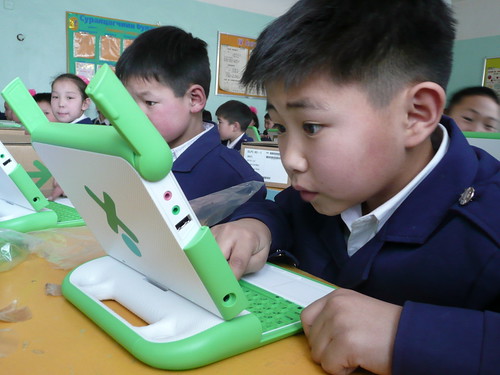
Technology has become a very essential part to our society structure. The wellness of our economy being depends a lot on technology. Not to mention that majority of the schools in our nation has taken the advantage of technology as a new approach to educate our new generation.I will always remember working with some 2nd graders in an elementary school last year, and their excitement every Monday because they could go to the computer lab to learn typing. From this experience, I strongly agree that including technology in classrooms can increase the students' interest in learning, which of course, is what every parent and teacher wish for.
In Tech 221, my expectations are to explore and learn more technological tools as preparations for my teaching career in the future. I realize there are a lot of websites and softwares out there that would be very useful in classrooms, yet I never seem to have any chances to find them. I know in fact if I start to recover them when I am already a teacher, it is going to be too much work. I am hoping to have a new experience with technology in this class and enjoy myself as well!
My first day observation of this class was, well, this is a very crowded class. It is both a good and bad thing to have that many students, good thing is there would be a lot of peer support when it comes to difficulties; bad thing is that it would be hard to get attentions from the teacher when there are more serious questions. I also like how our assignments are already put on the website so we can just refer back to it if we need any reminders.
Our weekly tasks seem very interesting and I am very excited for the upcoming weeks! :)
Subscribe to:
Posts (Atom)


